Search This Blog

Showing posts with label smartphone. Show all posts

20160714

Android Malware Detection Provides False Security (Technology)


Today I'm going to discuss adware. Adware is contained in software to generate revenue for the software company. It pushes advertisements of apps and other products, which consists of marketing propaganda designed to evoke emotions in the targeted audience, who are technology consumers.

On an Android smartphone, advertisment revenue generated by adware is shared between Google and app developers for apps offered on the Play Store and by third party providers. Play Store also offers apps to detect adware, but sometimes its detection is misleading.

As an example of this, the antivirus app AVG gave a false positive for Play Music on my smartphone. When I checked out AVG Threatlabs for this "threat", it stated: "Beware of Adware! No potential malware has been detected for this android app for the last 7 days. However, active adware was detected. ( Last updated: Jul 14, 2016 )".

Gee, thank you, AVG; I know all apps have active adware.

As an AVG subscriber, my use of AVG and AVG Zen (a Device Manager clone) provides the company with monthly and yearly revenue, just so they can tell me adware is active on my devices.

It sems as though I'm paying for a false sense of security. So the easy fix is to cancel my subscriptions to AVG and avoid clicking on ads that seem sketchy.

According to the AVG Threatlabs website, Play Music contains active adware: as part of Google's marketing scheme, it is also being included with other useful software for smartphones (Android and iPhone) and desktop computers.

Yet Android adware is included in almost all apps on Google Play Store. Therefore the AVG Threatlabs message that warns me to "beware of adware" is a scare tactic used by the company to influence users of the AVG products to subscribe to their service.

My, how subtle is the marketing propaganda for AVG is.


Here are optional instructions on how to turn off access to unknown sources of Android apps and how to opt out of ads targeting you. Disclaimer: I take no responsibility for what you do after reading these instructions.

Only two things need to be done:

1) Turn off access to third party providers Unknown Sources) of Android apps by turning that setting off in System Settings: Security under the heading Device Administration. The Unknown Sources option should be deactivated. If it's not, then I am going to assume you know what you are doing.

Optionally, you may want to control what ads you see.

2) In System Settings: Google: Services: Ads, you may opt out of interest-based ads and click on Ads by Google which will run Chrome, loading Ad Settings.

Note: Opting out won't completely stop ads — the Android Central article about Android Malware Scanners article provides details.


Android Central: Android Malware Scanners: Should You Use One?

20150111

'Casting Content (poem)

'Casting on the net is fun,
Wherever you are,
When you are doing it right.
For who can complain,
When consuming media?

Once, it used to be text, see?
With a modem,
I dial up a BBS —
Today, it is texting —
SMS and MMS.

Yet with two Android smartphones
You broadcast on TV —
Your forty-inch TV —
Pictures, music, and
Even videos — great, eh?

Even so, 'casting is new,
So new that it's like 1969
And Star Trek is in color —
'Casting is like that —
Lost in Space in monochrome.

That is modemming —
Lost in cyberspace back then
When it was all new
And shiny like the first kid
With color TV — great, eh?

One day, broadcasting content
Will be old — what then?
What will be the new toy, eh?
3D using your smarphone
With a thirty dollar toy?

20150108

Why are Some Cellphones Assigned to UK Ministry of Defense IP Address Range? (satire)

This post is only useful to computer nerds who know how to read email headers. If this post is over your head or causes you to believe conspiracy theories about corporations being in bed with the military of a friendly Western nation, then this post is not for you.

If you wish to skip my view on the topic, then here's the short version without my lengthy sarcasm: Ministry of Defense IP Address on My Phone

However, should you proceed to read what I've written, be warned that I have placed smilies to assure you where I am kidding.

YMMV

Originally I was going to title this post "Arbitrary Use of IP Addresses to Form CIDR Blocks May Be Common to Certain Wireless Carriers", but soon realized using more than seven words in a title would only bore people to death. :p

Even if my discovery confirmed only to me that Big Brother is sniffing our email packets on certain cellular mobile providers, then this isn't news at all. This has been known since the closer ties between Australia, Canada, New Zealand, the UK and the US were ratified with the intelligence agreement between these nations in the UKUSA Community, which has been known since 1973.;)

Also AUSCANNZUKUS is the Command, Control, Communication and Computers (C4) organization for united defense of these five nations (Five Eyes). 0_o

While espionage has two aspects to it, commercial and national security, the inadvertant use of one aspect of computer networking might expose a part of the private network of one corporation to the Internet if safeguards are not in place. :p

So let's take a closer look at what actually happened.

Today I was looking at an old email sent from one of my smartphones registered with a certain Canadian wireless mobility provider (CWMP) in gmail and found out how to access the email headers. What caught my eye was when I checked the IP addresses assigned to one of my smartphone by the CWMP's servers.

According to what I've been able to determine, that CWMP's servers assign two IP addresses to your smartphone.

One address identifies your phone to the world. It is in the range of 74.198.0.0 - 74.198.255.255 and is owned by the CWMP; the other address identifies you to the CWMP's server and is thus the internal IP address. It is in the range of 25.0.0.0 - 25.255.255.255 and was not owned by the CWMP.

Before I get to who owns the IP address range 25.0.0.0 - 25.255.255.255, it's internally used by the CWMP and will be different when your smartphone connects to the data servers for 2G/3G/4G. Usually, private networks consist of the following three ranges 10.0.0.0 - 10.255.255.255 to serve 16 million addresses; 172.16.0.0 - 172.31.255.255 to serve one million addresses; and 192.168.0.0. - 192.168.255.255 to server 64 thousand addresses. These numbers of addresses are a rough estimate, for the terms describing numbers consisting of "thousand" and "million" may be exchanged with the following numeric equivalents for accuracy, 1024 and 1048576.

If their servers are properly set up, then it will not broadcast to the actual owners of the IP address range 25.0.0.0 - 25.255.255.255 since it uses CIDR addressing and the NAT servers between the devices and the Internet give their public addresses, of which the 74.198.0.0 - 74.198.255.255 range is a subset.

For the actual owner of that address range is DINSA, Ministry of Defense, UK and is the "Computers" part of the C4 architecture, assigning IP addresses within that IP address range.

I'm sure the conspiracy theorists could draw implausible conclusions about this CWMP using UK defence network infrastructure at this point, but I feel that is an oversight the CWMP made in anticipation of having over 16 million customers sometime after 2014. ;)

However, as I have stated earlier, only this CWMP's servers assign each phone an internal IP address in the range 25.64.0.0 - 25.127.255.255 to handle over 4 million subscribers, provided the address mask is 255.192.0.0. However, this was true between June 2012 and August 8, 2012 according to email retained between those dates, and is representative of only one device out of a potential 4 million devices .

This means the CWMP has run out of private addresses in the range of 10.0.0.0 - 10.255.255.255 for over 16 million customers. Though, IPv6 provides unique local addresses to solve this problem.

Note also that the private internet IP address in the 25.64.0.0 - 25.127.255.255 range are dynamically assigned, i.e. the mobile servers assign a new number to a registered device everytime data is turned on. A data circuit between my IP address and that of a destination (plus.google.com at the IP address range 173.194.33.32/28) lasts as long as the device is within range of that cell tower. Then the data circuit is passed over to a second cell tower within range of my device. The same IP address for my device is used until I turn data off on my phone. When I again use data, a new IP address is assigned to my device.

FWIW the Bell network uses the private IP address range of 10.0.0.0 - 10.255.255.255 and most smartphones registered to them use a unique local address for each device.

Most likely, the CWMP's technicians have found the IPv6 learning curve so steep that they still rely on IPv4 addressing, for now. This is because of our use of the decimal system; not everyone can think in hexadecimal. ;)

This makes the smartphone a great tool to aid in IPv4-to-IPv6 translation. ;p

Update:

IMO the revelation by Edward Snowden tends to validate my analysis of the mentioned cellphone addresses. It may be due to DNS cache poisoning. Most likely, it is a result of a poor programming of a DNS server. If it turned out that the IP adresses in question arose out of DNS cache poisoning, then these IP addresses probably got "reassigned" sometime between now and almost forteen months ago. YMMV

Update 20150108:

DNS cache poisoning also led to IP address ranges originally assigned to Surrey Public Library to be also a part of a hotel in Whistler, probably proving that someone in the IT department adminstering that hotel's ip address range is the culprit.


Update history:
20140225.1921
20121108.2130
20121108.2331

Reference:

ECHR Fast-tracks Court Case on PRISM and TEMPORA (and VERYANGRYBIRDS?)
https://freedom-to-tinker.com/blog/axel/echr-fast-tracks-court-case-on-prism-and-tempora-and-very-angry-birds/

20140918

My First Technology Gig (satire)

It is amazing to see how wealthy retirees live in their big houses with two cars, two computers, a laptop, a tablet and a cheap HTC smartphone. (I won't mention the LG 230 flip phone much).

The new SUV is cool with an entertainment centre using bluetooth to hookup to the phone to play music on.

People this old will not have a clue of how to move their pictures off their phone onto their computer, and to put new pictures on their phone again. Nor will they know that they need a data USB cable to copy to and from their smartphone, or even how to get their phone to send music to their entertainment centre in the SUV.

Furthermore, they need to be reassured that knowing their computer password won't let me break into their computer on the Internet - I have to be in the den on their computer to do that. Also Facebook never automatically shares their intimate photos with the world - they have to do that themselves.

That is where I come in, to help them learn how to do it. Though, at their age, without daily practice, a week later they will have forgotten how to do it because they do not practice what I preach to them.

I think I have found my niche market for my technology skills: people over 60. Since it isn't right to charge them $80/hour, I'll take $20 a lesson, which can last from an hour to two hours.

There is no way I'd stay any longer. My reasoning is, it is impolite to stay at anyone's place for more than two hours unless they expressly have invited you for dinner too.

I sure like this new part-time job that I lucked into by helping my client Paul with his smartphone while at an LDS baptism last week.

20130609

Bell Canada has the Best Pay As You Go Deal

For $10.75 I can't go wrong, but need a Talk and Text plan to add to the data service since it costs 30 cents a minute for talk. While that will cause the price of a call to fall, the month service fee will rise.

If I just use my phone for data, then Bell dings me $10.75 a month. Even though it's a data lite plan (100 MB) I'll probably use it with wifi more often than the other smartphone.

Overall, i'm satisfied with the Pay As You Go because the phone part of the deal gives me a phone back up when I use my Samsung i757m.

Reference:

Bell prepaid plans: http://www.bell.ca/Mobility/Cell_phone_plans/Prepaid_plans

20130511

Saved: $5 at Future shop and the Source

Problem: I need a better charging system than what I have now which is a NiHCD portable power charger by Black and Decker.

It's only good with non-smartphone devices since smartphone have 1250mAh batteries which means only 75% of the charge will be met before the charger shuts off.

Soutioon:
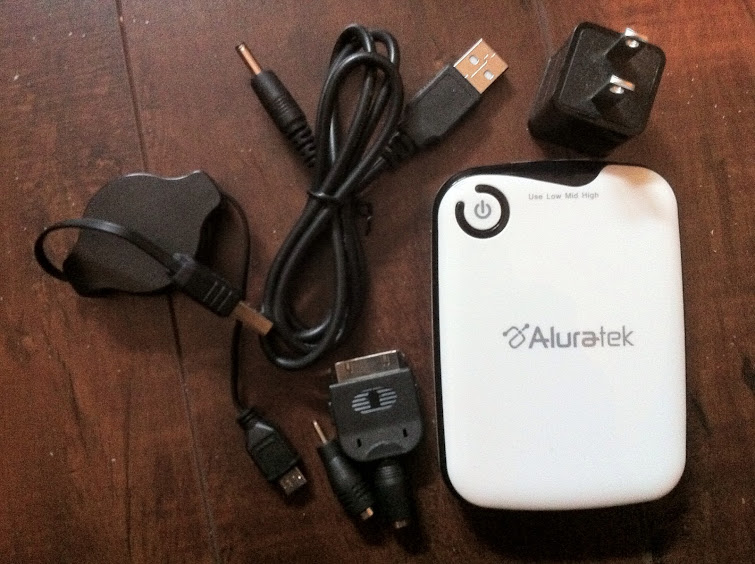
So I went to Future Shop and found the Aluratek 5000 mAh Portable Charger on sale for $10 plus tax.

All that was missing was the USB to DC cable, which I have since mine came with the Kodak camera I used to use before switching to my smartphones to take pictures in addition to the 101 other things such phones can do.

The only thing I don't like about the new charger is it does not have a second port like the one I originally wanted to buy from the DMAC store for $40, but felt that a better deal was waiting for me.

After looking at the adapters for various cellphones, I realized that they would be perfect with an AC-to-DC adapter.

So I bought a Newtech adapter and polarity adapter that matches both the charger's DC charging socket and the cellphone charging adapters which came with the Aluratek charger.

This means I could use the cellphone adapters with the AC-to-DC adapter and with the USB-to-DC cable.

If I didn't by the AC-to-DC adapter and polarity adapter, then I could have saved about $9 but even after buying it in addition to the charger, I still saved about $5 over the charger I saw at DMAC.

With the USB-to-DC cable and the cellphone adapters, I can charge the charger with my USB AC adapter and have a charger handy if my mobile devices' batteries go flat on me using the cellphone adapters with the cable.

This replaces my B&D charger, iPhone USB-to-iPhone adapter cable and retractable USB-to-micro USB cable at the expense of having the device closer to the charger.

Though it makes sense to keep the retractable USB-to-micro USB cable when charging my Android phone.

With the working phones I have, I only need the iPhone adapter and the Nokia adapter since the other working phones use micro-USB.

Of course, this complicates the number of parts to carry from originally 3 to the 5 pieces I intend to use (charger, USB-to-DC cable, two phone adapters, and the retractable USB cable).

Though, this also means I always have to carry my knapsack to hold all the pieces of my new charging kit.

The old charging kit.

The new charging kit.

20130303

Freedom Away from Technology


Although I admit to using technology a lot, both my PC and my smartphone, my time away from them, however brief, is a brief taste of freedom that I savor.

Even so, I still use my smartphone.

After the novelty of reading news on my smartphone wore off, I stopped using the news app, and the rare time I use it, I just scroll through the headlines until I find something interesting to read. Though, I've found that most news read in print I'd read a week earlier on my PC, not on my smartphone.

Mainly I use the smartphone as a phone, followed by taking pictures with the camera, and checking the weather and checking Google Plus for notifications.

Yet every time I am not using my PC or my smartphone, the freedom away from technology is worth every minute.

Away from technology I am free to feel the wind caressing my face, to watch the rain fall, and to hear the birds sing.

Without technology humility inspires me to protect the privacy of a moment's worth of freedom.

Then I return to my PC and smartphone renewed, to apply what I've learned about myself away in the time spent away from them.

20121222

Mobilicity Has Cheapest Data Plans!

Rogers Communications cannot match Sprint's $30 unlimited, similar to Chatr at $45 (capped at 100 MB) and especially WIND's $35 unlimited (capped at 10GB) and Mobilicity's $45 ($25 plan + $20 Premium Data capped at 20 GB).

An unlocked 3-SIM phone for the Chat-Fido-Rogers network with an app to change wap, internet, and mms/sms information would be a best buy overall, though two of the carriers (Fido and Rogers) would have 3G (GPRS and EDGE), 3G+ (UTMS, HSDA), and 4G (HSDPA, LTE) while Chatr lacks HSDPA and LTE.

In contrast an unlocked smartphone capable of handling the bands (Nokia 500) can be used on Mobilicity but only for Metro Vancouver coverage - ditto for Wind.

It might take some work to get the Nokia 500 to use with Bell Canada and Virgin Mobile Canada or TELUS and Koodo Mobile, as GSM and EDGE may not be available but UTMS may. It is doubtful HSDA/HDSPA or LTE would work since the Bell/Virgin network uses a different frequency from the Chatr-Fido-Rogers network, and the Koodo/Telus network may use a different quad/5-band frequency setting.

Sadly though, people have it hard setting up their email on a smartphone asitis. A lot of the owners me age barely play songs or watch videos onit.

The above post ought be spoken with a Scots or Northumberland accent afore anyone accuses me of syntax errors.

This is an update of a Google Plus post dated July 17, 2012.

20121208

First a Moment About My Favourite Cellphone Unlocker

Earlier today, I changed my blog's background theme.

we now interrupt this blog entry with a moment about my favourite cellphone unlocker

Then I went to get my Samsung A767 unlocked at my favourite place to get cellphones unlocked. Before I rant about the change of background theme on my blog, I'm going to do my first advertisement in a blog, which is a customer satisfaction plug rather than a paid advertisement. After digging in my wallet to find beyond SCREEN, I realized the proprietor has a website. If you are in Vancouver and don't know where to get your cellphone unlocked, then please check out beyond SCREEN. This is the second time I got one of my cellphones unlocked for $20. When my Samsung smartphone was unlocked, it took less than 30 minutes. This time around, it took 24 hours for the proprietor to get the unlock code and unlock my phone. I also paid upfront for getting the A767 unlocked around 11 AM yesterday after he copied my IMEI and personal information, and returned about 24 hours later with my phone. This time, he unlocked the A767 in less time than it took with my smartphone.

we now return you back to the rest of today's blog entry

GooglePlus members in my circles may have noticed my new blog theme.

Rather than the decidedly black theme, we're presented with a brown background theme. I must've been mentally constipated when I picked that theme. However, it appears to be a winner because one of the previous posts I wrote has gotten 10+ hits since posting it at 5:39 PM today.

Okay, sure, sometimes the first post of the day gets a lot of hits, but not within 4 hours of posting.

I think the last time I got 10+ hits was with the Sex Sells Commentary on Use of Women in Consumer Marketing. Though it only hit 11 the last time I reviewed my blog's webpage statistics.

Ok, wait a minute. 10 web hits isn't rare. As well, it turns out that my poems are sometimes popular and sometimes not. Ok, so it isn't the brown theme. It's the circumstances of that poem. ;)

Oh well! It might be a slow night. 0_o

20121021

Predicted Dates for Android 4.1 (Jelly Bean) and 4.2

After the upgrade to Android 4.0.4 in late August 2012 for my smartphone, I thought I had the best upgrade ever.

Now with Android 4.2 on its way, my prediction for upgrade to Jelly Bean via my provider is within a year (by October 2013) and Android 4.2 by March 2014

Since these are predictions about when my provider will upgrade Android, I continue to wait patiently until the upgrades get pushed to my phone.

When those upgrades happen, I'll make a note of them in this blog entry.

20110502

Fix: Acer Liquid E - SMS working but no Internet

NOTE: do not try the factory reset procedure mentioned in this article without contacting the support team of your mobile carrier. Also the Lookout app recommendation is not a product endorsement.

For the week before April 23, my Acer Liquid E smartphone stopped allowing 2G & 3G data access to the mobile network.

Rebooting didn't work: I'd get 15 seconds of data access, and then it'd stop.

At this point, I decided that my goal is to make my smartphone work with help from my mobile carrier's support team (Basic Support and Tech Support).

After calling my mobile carrier's Basic Support line, I was instructed to reboot my phone and call back on a landline if that did not work.

So I rebooted my smartphone again. No go.

Then I called back on a landline, and was handed over to Tech Support who talked me through the factory reset procedure.

Overall time spent fixing this: about thirty minutes.

Goal attained: a working smartphone!! :)

Note: the mobile carrier support asked for ID information to confirm my ID and to give directions to confirm my ownership of the smartphone (IMEI #). I freely complied with the support team to attain the goal of a working smartphone.

Because Google has an open source policy on Android apps, it's possible for malware to get into the Android Market. This happened recently when 21 apps were removed after Android users complained about the problem.

The Lookout Mobile Security app may be useful for detecting the DroidDream rootkit malware which led to apps being removed.

However, it requires your gmail address and a password (NOT YOUR GMAIL PASSWORD) to backup data (contacts, call history & pictures) and locate a missing phone.

Lookout also gives you the option to use the backup and missing phone features. After using it, I realized that the following security procedures renders the use of Lookout moot, save for the missing phone feature.

A working smartphone must be lean in apps. This especially means NO GAMES. I state this because I used to randomly play a game app for hours until I got bored with it, only to delete that game and randomly pick another game I liked.

As well, website browsing should be limited to safe sites. This means NO PORN SITES because the majority of them may have java malware to compromise Android security.

In order to ensure that my phone keeps working, I can live without games and porn. As well, I will reduce the number of high risk apps on my phone.

To ensure that my smartphone never ends up stolen, I make sure to use it discreetly.

20110208

Smartphones and Security Risks

Since javascript is in most web browsers on smartphones, the crufty cracker working for "data crime gangs" would probably compile a java archive executable to enslave the unsophisticated user's smartphone. That user will usually complain that the Internet is slow and sometimes his smartphone will crash. Later on, he might get spammed via SMS, MMS and email.

As for now, this is speculation, but it's based on the news gleaned from various tech websites.

Is my smartphone protected? Hella strongly, cos i have an antivirus suite guarding my phone as we speak.

Though the most annoying app would be one which has to do with gaming but becomes so addictive that most of your gameplaying is done with the phone plugged into the charger.

Currently I have the Sputnik test suite running in my web browser on the Liquid E. It's been about an hour since I started it, and I am guesstimating that the battery has gone from about 83% to about 50%, which is means a load which takes 3 hours to drain to below 5%.

In comparison, a full charge allows for 5 hours of mp3 playing time, about 4 hours of talk time, and about 3 hours of picture taking.